Is the unsightly tangle of cables behind your television stand turning your sleek living room into a chaotic mess? You’re not alone. In an era where minimalist design reigns supreme, a web of wires can instantly detract from an otherwise perfectly curated space, creating not just an eyesore but also a potential dust trap and tripping hazard. Whether you’ve just invested in a new entertainment system or are simply fed up with the visual clutter, achieving a clean, organized look is entirely within your reach. This comprehensive guide will walk you through easy, effective DIY methods to conceal those messy cords, transforming your entertainment area into a harmonious and visually appealing focal point. Get ready to reclaim your living room with practical solutions that anyone can implement.
The Clutter Conundrum: Why Hide Your TV Cords?
Beyond the obvious aesthetic improvements, managing your television cords offers several compelling benefits. A neatly organized setup minimizes the visual noise in your living space, contributing to a calmer and more sophisticated ambiance. It also significantly reduces dust accumulation, making cleaning easier and potentially prolonging the life of your electronics by preventing overheating caused by blocked vents. Most importantly, it enhances safety by eliminating tripping hazards, especially crucial in homes with children or pets. A well-managed cord system protects your valuable equipment from accidental disconnections and damage, giving you peace of mind that your entertainment hub is both functional and safe.
Essential Tools for a Tidy Entertainment Hub
Before you embark on your cord-hiding mission, gathering the right tools will make the process smoother and more effective. Many of these items are inexpensive and readily available, ensuring your DIY project is both budget-friendly and achievable.
- Cable Ties (Zip Ties or Reusable Velcro Straps): Indispensable for bundling multiple wires together. Velcro straps offer flexibility for future changes.
- Cable Management Sleeves/Cord Hiders: These flexible tubes or wraps enclose several cables, consolidating them into a single, cleaner bundle.
- Adhesive Cable Clips/Hooks: Ideal for securing individual cables or bundled wires along the back of furniture, walls, or TV stands, preventing them from dangling.
- Cable Raceways/Cord Covers: Surface-mounted channels that attach to walls or furniture, completely encasing wires. Many are paintable to blend with your décor.
- Surge-Protected Power Strip: Consolidates multiple plugs into one unit, protecting your electronics from power surges, and often making it easier to manage power cords.
- Drill (for In-Wall Solutions): Necessary if you plan a more permanent in-wall cable management system for a wall-mounted TV.
- Measuring Tape & Pencil: For planning routes and marking installation spots.
- Scissors/Wire Cutters: For trimming cable ties or raceways.
- Labels (Optional but Recommended): To identify individual cables, simplifying future troubleshooting or reconfigurations.
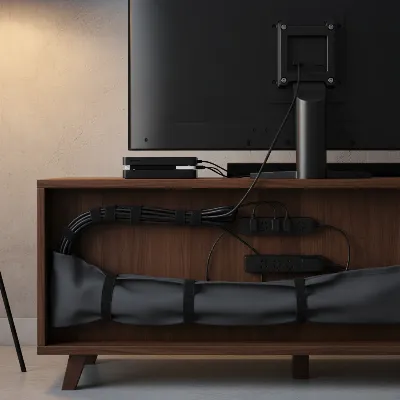 A modern living room with a TV stand, all cables neatly organized behind it with cable ties and sleeves, showcasing a clutter-free aesthetic.
DIY Methods to Master TV Cord Concealment
Transforming your messy cord situation into an organized masterpiece doesn’t require professional help. With a few simple techniques and readily available tools, you can achieve a clean, streamlined look.
Embrace Cable Management Sleeves and Ties
The simplest and most immediate solution for taming cable chaos is to group them together. Individual wires often look messier than a single, thicker bundle.
- Cable Sleeves: These flexible, often zippered or wrap-around sleeves, gather all your cables (HDMI, power, audio) into one neat cylinder. They come in various lengths and colors, allowing you to choose one that blends with your stand or wall. Simply open the sleeve, insert your cables, and secure it.
- Velcro Ties or Zip Ties: For an even more budget-friendly approach, use Velcro ties or zip ties to bundle wires. Group similar cables together first (e.g., all power cords, all HDMI cords) and then use ties to create a cohesive bundle. Velcro ties are particularly useful as they can be easily undone and redone if you need to add or remove a cable.
|
Our Picks for the Best TV Stand in 2026
As an Amazon Associate I earn from qualifying purchases.
|
||
| Num | Product | Action |
|---|---|---|
| 1 | HOOBRO TV Stand with Charging Station to 55 Inches, LED Entertainment Center, Media TV Console Table with Open Storage Shelving for Living Room, Bedroom, Black BB122UDDS01 |

|
| 2 | YGEOMER Entertainment Center for Up to 55 Inch TVs, TV Stand with Power Outlet and Open Storage Shelves, TV Media Console Table for Living Room and Bedroom, Black |
|
| 3 | TV Stand for TVs up to 55", Entertainment Center with 2 Fabric Drawer, Media Console with Shelves, Television Stands for Living Room, Bedroom, Black DS02BB |
|
| 4 | Furologee TV Stand for TVs up to 55 Inch, Entertainment Center with Open Storage Shelves, Media Console Table with Soundbar Shelf for Living Room, Bedroom, Rustic Brown |
|
| 5 | 23 Inch to 50 Inch Floor Small Corner TV Stand with Storage Shelves for Living Room Bedroom, Universal Floor Television Stands with Mount, Rustic Brown Corner TV Table Desk Shelf for Small Space |
|
| 6 | HOOBRO LED TV Stand with Power Outlets to 65 inch TV, Gaming Entertainment Center with Glass Shelves and Large Drawer, Modern Media TV Console Table for Living Room Bedroom, White WT14UDDS01 |
|
| 7 | Furinno Sully 3-Tier Stand for TV up to 40, Espresso/Black |
|
| 8 | PERLESMITH Universal Swivel TV Stand for 24-60 inch TVs up to 99 lbs, 12 Height Adjustable Table Top TV Stand, TV Base Stand with Tempered Glass Base, Max VESA 400x400mm, PSTVS33 |
|
| 9 | HOOBRO TV Stand with Power Outlets to 65 Inches, TV Console Table with Open Storage Shelves, Industrial Media Entertainment Center for Living Room Bedroom, Rustic Brown and Black BF40DS01 |
|
| 10 | WALI Floor TV Stand with Power Outlet, Tall TV Stand Mount for 32-75 inch TV up to 110 lbs, Swivel and Height Adjustable TV Stands with Wood Base for Bedroom, Office(TVDVD-7P), Black |
|
By consolidating your wires, you instantly reduce the visual clutter and make them much easier to conceal behind your TV stand or other furniture.
Utilize Cable Raceways and Cord Covers
When wires need to run along a visible surface, such as a wall or the top of your TV stand, cable raceways and cord covers provide an elegant solution.
- Surface-Mounted Raceways: These plastic channels adhere to the wall or furniture with strong adhesive. You simply place your cables inside, snap the cover shut, and the wires are completely hidden. Many raceways are paintable, allowing you to match them to your wall color for an almost invisible finish. They are available in various sizes to accommodate different numbers of cables.
- Decorative Cord Covers: For a softer, more integrated look, consider fabric cord covers that can complement your room’s aesthetic. Some are designed to mimic crown molding or blend seamlessly with baseboards.
These solutions are less invasive than in-wall options and offer easy access to cables should you need to reconfigure your setup.
Strategic Furniture Placement
Sometimes, the best hiding spot is right in plain sight—or rather, just behind it. Leveraging your existing furniture can be a highly effective way to obscure messy cords.
- Behind the TV Stand: Position your TV stand slightly away from the wall to create a narrow gap. Run all your bundled cables along the back of the stand, securing them with adhesive clips or hooks to prevent them from drooping. Ensure your power strip is also mounted to the back of the stand, keeping it off the floor.
- Other Furniture: Utilize bookshelves, cabinets, or even large floor plants to strategically block the view of any exposed wires. Arrange these items to create a visual barrier between the viewer and the cable clutter.
- Decor Items: Smaller decorative items like photo frames, sculptures, or potted plants can also serve as clever camouflages for shorter cable runs or power strips.
This method integrates seamlessly with your existing décor and requires minimal effort, making your TV setup a natural part of your room’s design.
The In-Wall Solution for a Seamless Look
For wall-mounted televisions, the ultimate solution for a truly invisible cable setup is running the wires inside the wall. This method requires a bit more DIY effort but delivers a remarkably clean and professional finish.
- In-Wall Cable Management Kits: These kits typically include all the necessary components: a power extension, low-voltage cable plates, and sometimes a drill bit. You’ll install two openings in your drywall: one directly behind your TV and another lower down, usually near an existing power outlet or your TV stand.
- Threading Cables: The kit provides a pathway (often a flexible tube or simply the open wall cavity) to thread your power and AV cables through the wall, from the top opening to the bottom. The power extension included in the kit ensures power is supplied safely.
While this approach demands more planning and basic DIY skills (and adherence to local electrical codes), the result is a sleek, wire-free wall that elevates the entire room’s aesthetic.
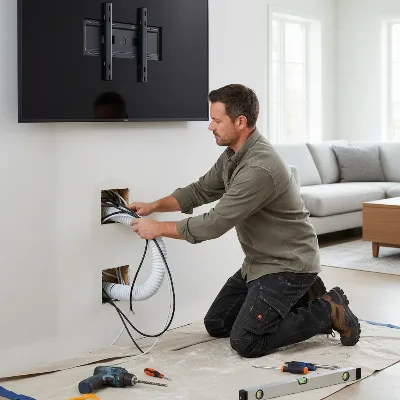 A DIYer installing an in-wall cable management kit behind a wall-mounted TV, showing neatly channeled wires through the wall for a clean, hidden look.
Leverage Integrated TV Stands and Media Consoles
Many modern TV stands and media consoles are designed with cable management in mind, offering built-in solutions that simplify the process.
- Built-in Channels and Grommets: Look for stands that feature pre-drilled holes (grommets) in the back panels or shelves, allowing cables to pass through neatly. Some designs even include internal channels to guide wires from one compartment to another.
- Enclosed Storage: Consoles with cabinet doors or drawers are excellent for hiding not only cables but also larger devices like cable boxes, gaming consoles, and routers, keeping them out of sight when not in use. This creates a cohesive, clutter-free appearance.
- Mountable Back Panels: Some TV stands come with a solid back panel where you can easily attach power strips or cable clips, ensuring all wires remain hidden behind the unit.
Investing in a TV stand with integrated cable management can be a game-changer, providing a dedicated space for all your entertainment gear and its accompanying wires.
Clever Power Strip Management
The power strip is often the source of the most visible clutter. Managing it effectively is crucial for a tidy setup.
- Mount to Furniture: Instead of letting your power strip lie on the floor, mount it to the back of your TV stand or inside a cabinet using adhesive strips, screws, or zip ties. This keeps it off the floor and out of sight.
- Decorative Boxes: For an immediate and stylish fix, place your power strip and any excess cable length into a decorative box. Many companies sell specialized cable management boxes, but a stylish storage box or even a hollowed-out “book” can work wonders. This keeps everything contained and blends seamlessly with your décor.
Pro Tips for Optimal Cable Organization
Once you’ve implemented your chosen hiding methods, a few extra tips can help maintain a pristine and functional entertainment area.
- Label Your Cords: Use small labels (or even colored tape) to mark each end of your cables. This will save you immense frustration when you need to unplug or reconfigure a specific device.
- Separate Power and AV Cables: Whenever possible, run power cords separately from audio/video cables. This can help prevent electromagnetic interference, which might impact the quality of your signal.
- Regular Checks: Periodically check your cable management system. Wires can shift, dust can accumulate, and connections might loosen. A quick tidy-up every few months will keep things looking perfect.
- Future-Proofing: When choosing your cable management solutions, consider future additions or changes to your entertainment system. Opt for methods that allow for easy expansion or modification, such as reusable Velcro ties or raceways with removable covers.
- Only Connect What’s Necessary: Before you even begin, disconnect any devices or cables you no longer use. Less is more when it comes to cable management.
Conclusion
Taming the unruly mess of cables behind your TV stand doesn’t have to be a daunting task. By utilizing simple DIY methods like bundling with sleeves and ties, employing clever raceways, strategically placing furniture, or even undertaking an in-wall installation, you can transform your entertainment area into a streamlined, safe, and visually appealing space. A clutter-free environment not only looks better but also contributes to a sense of calm and order in your home. Take the first step today, gather your tools, and enjoy the satisfaction of a perfectly organized TV setup. What simple change will you make to start decluttering your cords?
Frequently Asked Questions
Can I hide TV wires without drilling into the wall?
Absolutely! Many effective methods exist that don’t require drilling, such as using adhesive cable clips and raceways that stick to surfaces, bundling cables with sleeves or ties, or strategically placing furniture and decorative items to conceal them.
What is the easiest DIY way to hide TV cords?
The easiest DIY method is often to bundle your cables together using Velcro ties or cable sleeves, and then secure these bundles behind your TV stand with adhesive cable clips. This immediately reduces clutter with minimal effort.
Is it safe to run power cables under a rug?
No, it is generally not safe to run power cables under rugs as they can overheat, get damaged, and pose a fire hazard. Low-voltage cables like speaker wires or Ethernet cables are safer to run under rugs, but it’s best to use a flat, durable raceway to protect them and ensure safety in low-traffic areas.
How can I hide a power strip behind my TV stand?
You can hide a power strip by mounting it directly to the back of your TV stand using adhesive strips, screws, or zip ties. Alternatively, place the power strip and any excess cabling inside a decorative cable management box.
How often should I reorganize my TV cords?
It’s a good idea to check and reorganize your TV cords every few months, or whenever you add or remove a device. Regular checks prevent dust buildup, ensure cables remain secure, and help maintain the clean look you’ve achieved.
