A wobbly TV stand poses a significant safety risk to your television and household members. Most unstable TV stands can be quickly resolved using common household tools like screwdrivers, wrenches, and leveling aids such as shims or adjustable feet. Identifying the root cause, whether it’s loose hardware, uneven flooring, or improper assembly, is the first step to applying an effective fix and ensuring your entertainment setup is secure.
Identifying the Root Cause of Your Wobbly TV Stand
Before you can fix a wobbly TV stand, you need to understand why it’s wobbling. A thorough inspection will reveal whether the issue lies with the stand’s construction, its placement, or general wear and tear. Start by gently pushing on the stand from different angles to observe its movement.
Loose Hardware and Connections
The most common culprit behind a wobbly TV stand is loose screws, bolts, or other fasteners. Over time, vibrations from the television, minor bumps, or even just shifting the stand can cause these connections to loosen. This is especially prevalent in flat-pack furniture that uses cam locks or basic screws for assembly. A simple tightening can often resolve the issue entirely.
Uneven Flooring or Damaged Legs
Sometimes, the stand itself is perfectly stable, but the surface it rests on is not. Uneven floors, thick carpets, or even small debris under a leg can create an imbalance, causing the stand to rock. Alternatively, one or more legs might be damaged, bent, or shorter than the others, leading to instability.
Improper Assembly or Material Weakness
If your TV stand was recently assembled, an oversight during installation—such as not fully tightening all connections or misaligning parts—could be the cause. For older stands, material fatigue, especially in particle board or softer woods, can lead to weakened joints or stripped screw holes, making it difficult for the hardware to hold securely. Over time, repeated stress on certain joints can lead to structural compromise.
Overloading and Weight Distribution
TV stands are designed to support a specific weight. Exceeding this limit or placing disproportionate weight on one side (e.g., a heavy speaker or game console) can stress the stand’s structure and lead to instability. Always ensure your TV and all accompanying equipment are within the stand’s weight capacity and distributed as evenly as possible.
Essential Tools and Materials for a Stable Solution
You don’t need a professional workshop to tackle a wobbly TV stand. Most fixes require only a few basic tools and easily accessible materials. Having these on hand will make the repair process smooth and efficient.
Basic Hand Tools (Screwdrivers, Wrenches, Hammer)
|
Our Picks for the Best TV Stand in 2026
As an Amazon Associate I earn from qualifying purchases.
|
||
| Num | Product | Action |
|---|---|---|
| 1 | WALI Floor TV Stand with Power Outlet, Tall TV Stand Mount for 32-75 inch TV up to 110 lbs, Swivel and Height Adjustable TV Stands with Wood Base for Bedroom, Office(TVDVD-7P), Black |

|
| 2 | Furologee TV Stand for TVs up to 55 Inch, Entertainment Center with Open Storage Shelves, Media Console Table with Soundbar Shelf for Living Room, Bedroom, Rustic Brown |
|
| 3 | HOOBRO LED TV Stand with Power Outlets to 65 inch TV, Gaming Entertainment Center with Glass Shelves and Large Drawer, Modern Media TV Console Table for Living Room Bedroom, White WT14UDDS01 |
|
| 4 | HOOBRO TV Stand with Charging Station to 55 Inches, LED Entertainment Center, Media TV Console Table with Open Storage Shelving for Living Room, Bedroom, Black BB122UDDS01 |
|
| 5 | HOOBRO TV Stand with Power Outlets to 65 Inches, TV Console Table with Open Storage Shelves, Industrial Media Entertainment Center for Living Room Bedroom, Rustic Brown and Black BF40DS01 |
|
| 6 | 23 Inch to 50 Inch Floor Small Corner TV Stand with Storage Shelves for Living Room Bedroom, Universal Floor Television Stands with Mount, Rustic Brown Corner TV Table Desk Shelf for Small Space |
|
| 7 | YGEOMER Entertainment Center for Up to 55 Inch TVs, TV Stand with Power Outlet and Open Storage Shelves, TV Media Console Table for Living Room and Bedroom, Black |
|
| 8 | PERLESMITH Universal Swivel TV Stand for 24-60 inch TVs up to 99 lbs, 12 Height Adjustable Table Top TV Stand, TV Base Stand with Tempered Glass Base, Max VESA 400x400mm, PSTVS33 |
|
| 9 | TV Stand for TVs up to 55", Entertainment Center with 2 Fabric Drawer, Media Console with Shelves, Television Stands for Living Room, Bedroom, Black DS02BB |
|
| 10 | Furinno Sully 3-Tier Stand for TV up to 40, Espresso/Black |
|
A good set of screwdrivers (Phillips and flathead) is indispensable for tightening loose fasteners. An adjustable wrench will be useful for any nuts and bolts. A hammer can be handy for gently tapping parts into alignment or securing furniture tacks. Ensure you use the correct size screwdriver or wrench to avoid stripping screw heads or damaging hardware.
Leveling Aids (Shims, Pads, Adjustable Feet)
To counteract uneven floors or legs, you’ll need leveling solutions. Wooden shims, furniture felt pads, or even folded cardboard can be used as temporary or semi-permanent spacers under shorter legs. Some TV stands come with integrated adjustable feet, which allow for quick, precise leveling by twisting them up or down. If your stand lacks these, you can often purchase and install threaded leveling feet for a more professional fix.
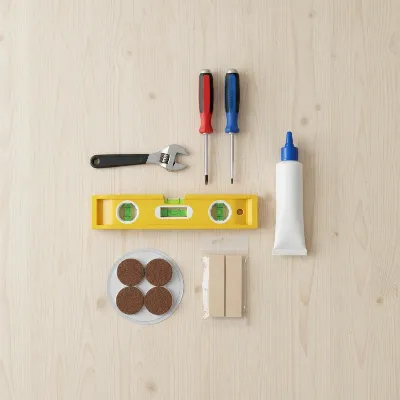 Various tools for fixing a wobbly TV stand including screwdrivers, a level, wood glue, and shims.
Adhesives and Reinforcements (Wood Glue, Brackets)
For weakened joints or stripped screw holes, wood glue is a powerful ally. It can re-bond wood fibers and fill gaps for a stronger connection. For more substantial reinforcement, L-brackets, corner braces, or even simple crossbars made from spare wood can be added to the stand’s frame to enhance its rigidity and prevent lateral movement. For particle board, where glue might not adhere well, brackets are often a more reliable long-term solution.
Step-by-Step Guide to Fixing a Wobbly TV Stand
Once you’ve diagnosed the problem and gathered your tools, you’re ready to dive into the repair. Follow these steps methodically to restore stability to your TV stand.
Step 1: Clear the Stand and Conduct a Thorough Inspection
Safety first: remove your television and all other electronic equipment from the stand. This not only makes the stand easier to move and work on but also prevents accidental damage. With the stand clear, visually inspect every joint, screw, and leg. Look for cracks, bent parts, missing hardware, or visible gaps where pieces should meet snugly. Gently wiggle individual components to pinpoint exactly where the instability originates.
Step 2: Tighten All Loose Screws and Bolts
Using your screwdriver or wrench, go over every screw, bolt, and nut on the TV stand. Turn them clockwise until they are snug. Be careful not to over-tighten, especially with particle board furniture, as this can strip the holes or crack the material. If a screw keeps spinning without tightening, it’s likely stripped, which will require a more advanced fix (see “Advanced Techniques” below).
Step 3: Address Unevenness: Leveling the Legs
Place a spirit level on top of the TV stand, checking it from front to back and side to side. Identify which leg or legs are not making full contact with the floor.
- For minor wobbles: Slide furniture pads, wooden shims, or even folded pieces of cardboard under the identified short leg(s) until the stand is perfectly level.
- For adjustable feet: Twist the adjustable feet on the stand until the wobble is eliminated and the stand is level.
- For permanent fixes: If a leg is consistently shorter, and you’re confident in your DIY skills, you might carefully sand down the longer legs or attach a small, sturdy block to the bottom of the shorter leg. Ensure the stand is on a known flat surface during this process.
Step 4: Reinforce Weak Joints with Glue or Brackets
If tightening screws didn’t fully resolve the wobble, or if you found loose joints with visible gaps, reinforcement is necessary:
- Using Wood Glue: For wooden stands, disassemble the wobbly joint(s) if possible. Clean out any old glue residue using a chisel or sandpaper. Apply a generous amount of wood glue to both surfaces of the joint, reassemble, and clamp the pieces together firmly until the glue dries completely (refer to the glue’s instructions for drying time). Wipe away any excess glue immediately with a damp cloth.
- Adding Brackets: For any type of stand, particularly those made from particle board, L-brackets or corner braces can significantly improve stability. Position these brackets at the corners where horizontal and vertical pieces meet. Predrill pilot holes to prevent splitting the wood, then secure the brackets with appropriate screws.
Step 5: Check and Redistribute Weight
After making structural adjustments, return your TV and equipment to the stand. Take a moment to ensure that the weight is distributed evenly across the surface. Place the TV centrally, and arrange other items like soundbars, game consoles, or decor symmetrically. This helps prevent undue stress on any single part of the stand and maintains overall balance.
Advanced Techniques for Stubborn Wobbles
Some TV stands might present more challenging stability issues that require a bit more effort than simple tightening or shimming. These advanced techniques can provide a robust solution for persistent wobbles.
Installing Crossbars or Back Panels
For open-backed TV stands, especially those made from lighter materials, adding a rigid back panel can dramatically improve stability by preventing racking (sideways movement). You can cut a piece of plywood or masonite to fit the back of your stand and secure it with small nails or screws. Similarly, installing crossbars or stretchers between the legs or vertical supports can add significant lateral stability. These can be custom-cut pieces of wood or metal fastened with screws and L-brackets.
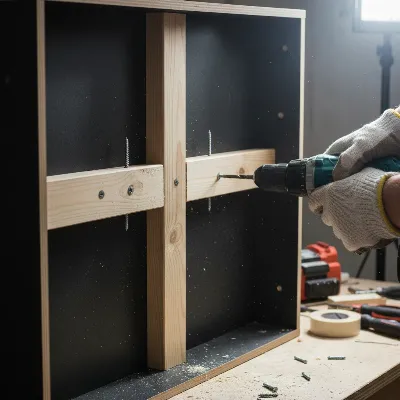 A person installing a wooden crossbar to reinforce the back of a wobbly TV stand.
Repairing Stripped Screw Holes
If a screw hole is stripped, meaning the screw no longer grips the material, wood glue and toothpicks can often fix it. Remove the stripped screw. Apply wood glue into the hole and insert several wooden toothpicks or small wooden splinters until the hole is packed tightly. Break off any protruding toothpicks flush with the surface. Let the glue dry completely. Once dry, pre-drill a small pilot hole through the hardened glue and toothpicks, and then reinsert the screw. The glue-hardened material will provide new threads for the screw to bite into.
Replacing Severely Damaged Components
In cases where a leg is cracked, bent, or completely broken, or a major structural component is compromised, replacement might be the best course of action. Measure the damaged part precisely and look for replacement pieces at hardware stores or online. For legs, ensure the new ones match in height and attachment mechanism. If the stand is made of custom parts, contacting the manufacturer or a skilled carpenter might be necessary.
Maintaining Stability: Preventive Measures
Once you’ve successfully fixed your wobbly TV stand, taking a few proactive steps can help prevent future instability and ensure its longevity. Prevention is always easier than repair.
Regular Inspections
Make it a habit to periodically check your TV stand for any signs of loosening or wear. A quick visual inspection and a gentle wiggle test every few months can help you catch minor issues before they escalate into major wobbles. Tighten any screws or bolts that feel loose right away.
Correct Loading and Placement
Always adhere to the manufacturer’s recommended weight capacity for your TV stand. Distribute the weight of your TV and other devices evenly across the stand’s surface. Avoid placing extremely heavy items on shelves not designed to bear significant loads. Position the TV stand on a level surface, and if your floors are uneven, use permanent leveling feet or shims from the outset.
Using Anti-Tip Straps for Added Safety
While anti-tip straps don’t directly fix a wobbly stand, they are a critical safety measure, especially in homes with children or pets. These straps secure your television to the stand or directly to the wall, preventing it from tipping over even if the stand is jostled. They provide an extra layer of protection against accidental falls, which can cause serious injury or damage. It’s a simple, inexpensive addition that offers immense peace of mind.
Conclusion
A wobbly TV stand can be a source of frustration and a potential hazard, but it’s a problem you can often solve with confidence using basic tools and a systematic approach. By carefully identifying the cause, whether it’s loose hardware, unevenness, or weakened joints, and applying the right fix—from simple tightening and shimming to more robust reinforcement—you can restore stability to your entertainment center. Regular maintenance and smart placement will further ensure your TV stand remains secure for years to come. Don’t let a shaky stand diminish your peace of mind or compromise your home’s safety; take action today and enjoy a stable, secure setup.
What other overlooked areas do you think contribute to furniture instability in modern homes?
Frequently Asked Questions
Can I use cardboard to fix a wobbly TV stand?
Yes, folded cardboard can serve as a temporary shim for minor wobbles, especially if your floor is slightly uneven. For a more durable and aesthetically pleasing solution, consider using wooden shims, felt pads, or adjustable leveling feet.
How often should I check my TV stand for wobbling?
It’s a good practice to check your TV stand for stability every few months or whenever you rearrange your room or move the stand. This helps catch loose connections or minor unevenness before they become significant issues.
What if my TV stand is made of particle board?
Particle board stands are prone to stripped screw holes and weaker joints. For these, tightening screws gently, reinforcing with L-brackets, and using wood glue with toothpicks for stripped holes are effective. Adding a rigid back panel can also greatly enhance stability.
Is wood glue strong enough for wobbly joints?
Yes, quality wood glue, when properly applied and allowed to dry with clamping pressure, can create extremely strong joints, often stronger than the wood itself. It’s particularly effective for re-securing loose wooden joints by bonding the wood fibers.
Frequently Asked Questions
Can I use cardboard to fix a wobbly TV stand?
Yes, folded cardboard can serve as a temporary shim for minor wobbles, especially if your floor is slightly uneven. For a more durable and aesthetically pleasing solution, consider using wooden shims, felt pads, or adjustable leveling feet, which offer better long-term stability.
How often should I check my TV stand for wobbling?
It's a good practice to check your TV stand for stability every few months or whenever you rearrange your room or move the stand. This helps catch loose connections or minor unevenness before they become significant issues, preventing potential damage or injury.
What if my TV stand is made of particle board?
Particle board stands are prone to stripped screw holes and weaker joints. For these, tightening screws gently, reinforcing with L-brackets, and using wood glue with toothpicks for stripped holes are effective. Adding a rigid back panel can also greatly enhance stability by preventing racking.
Is wood glue strong enough for wobbly joints?
Yes, quality wood glue, when properly applied and allowed to dry with clamping pressure, can create extremely strong joints, often stronger than the wood itself. It's particularly effective for re-securing loose wooden joints by bonding the wood fibers, providing a durable fix.
What are common reasons a TV stand becomes unstable?
A TV stand typically becomes unstable due to loose screws or bolts, uneven flooring, damaged legs, or improper assembly. Overloading the stand or uneven weight distribution can also stress its structure, leading to wobbling and potential safety hazards.
How to Fix a Wobbly TV Stand
Follow these steps to identify and fix common issues causing your TV stand to wobble, ensuring a stable and safe entertainment setup.
Remove your television and all other equipment from the stand for safety and ease of access. Visually inspect every joint, screw, and leg for cracks, bent parts, or visible gaps. Gently wiggle components to pinpoint the exact source of instability.
Using the correct screwdriver or wrench, tighten every screw, bolt, and nut on the TV stand clockwise until snug. Be careful not to over-tighten, especially with particle board, to avoid stripping holes or cracking material. If a screw spins, it may be stripped.
Place a spirit level on the stand to identify uneven legs. For minor wobbles, slide furniture pads or wooden shims under shorter legs. If your stand has adjustable feet, twist them until the stand is perfectly level and stable on the floor.
If tightening isn't enough, reinforce weak joints. For wooden stands, apply wood glue to disassembled joints and clamp until dry. For particle board or added strength, install L-brackets or corner braces at critical connection points, pre-drilling pilot holes.
After structural adjustments, return your TV and equipment. Ensure weight is distributed evenly across the stand's surface, placing the TV centrally and arranging other items symmetrically. This prevents undue stress and maintains overall balance.

I tried all the suggestions for my wobbly TV stand, including tightening all the screws and checking for uneven flooring. While it’s a little better, it still has a slight wobble when I move the TV. I think my issue might be more with the original assembly, as it’s an older unit. Good tips though, just didn’t completely solve my specific problem.
This guide was a lifesaver! I thought I was going to have to buy a whole new TV stand because it was so wobbly, especially when my kids ran by. Following the steps to check for loose hardware made all the difference. It’s solid as a rock now, and I didn’t even need any special tools, just my trusty screwdriver.
My entertainment center has been a bit unstable for a while, and I always just ignored it. The tip about using leveling aids like shims was really helpful. My floor isn’t perfectly even, and a couple of shims under one leg completely fixed the tilt. It’s much safer now, especially with my big screen TV.
Excellent advice! I appreciated the emphasis on identifying the root cause first. My stand had a combination of loose bolts and one of the adjustable feet was stripped. After replacing the foot and tightening everything up, it’s perfectly stable. No more worries about my expensive TV taking a tumble.