Securing a heavy TV to its stand safely is crucial for preventing tip-over accidents, especially in homes with children or pets. Modern, slim TVs often have smaller, less stable bases, increasing this risk. You can firmly secure your television using anti-tip straps, heavy-duty zip ties, or by anchoring the TV stand to the wall, significantly enhancing stability and safety.
Why Securing Your TV is Crucial
The statistics surrounding TV tip-over incidents are startling and underscore the urgent need for preventative measures. According to reports, thousands of individuals, many of them children, are injured annually from falling TVs and furniture. Tragically, these incidents can even be fatal. While a falling TV might seem like a rare occurrence, the combination of a large screen, an unstable base, and the natural curiosity of a toddler or the playful swipe of a pet creates a genuine hazard. A secure TV mitigates these risks, offering both a safer living space and protecting your investment from accidental damage.
Essential Tools and Materials for DIY TV Security
Before you begin securing your TV, gathering the right tools and materials will make the process smooth and efficient. Most items are readily available at hardware stores or online.
Here’s a checklist of what you might need:
- Anti-tip straps: These typically come in metal or heavy-duty nylon, often with hardware included.
- Screwdriver or power drill: Essential for attaching straps and creating pilot holes.
- Stud finder: Crucial if you plan to anchor the TV or stand to a wall, ensuring a strong connection point.
- Pencil or marker: For marking drill points.
- Measuring tape: To ensure proper placement and alignment.
- Heavy-duty zip ties or cable ties: A simple, cost-effective DIY option.
- Wall anchors: If drilling into drywall where no stud is present (though drilling into a stud is always preferred for maximum security).
- Gloves: To protect your hands during installation.
Having these items on hand will ensure you can tackle the job effectively and safely.
Step-by-Step Guide: Securing Your TV to its Stand
Securing your television doesn’t have to be a complex task. With a few simple steps and the right approach, you can significantly enhance your TV’s stability.
Assess Your TV and Stand
The first step in securing your TV involves a thorough assessment of both the television and the furniture it rests upon. Begin by locating the VESA mounting holes on the back of your TV; these are standard screw holes designed for wall mounts or, in this case, anti-tip straps. Ensure your TV stand is inherently stable, level, and robust enough to support the television’s weight and size. A stand that is too small or wobbly from the start will compromise any security measures you implement. Always position the TV as far back on the stand as possible to maximize its balance and minimize the chances of it being pulled forward.
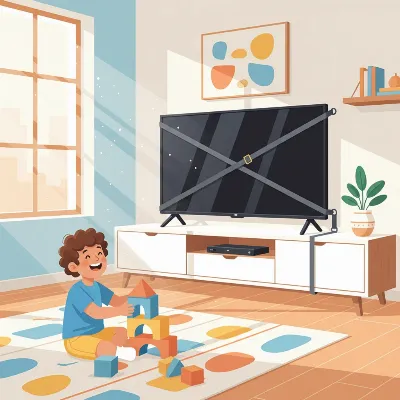 Illustration of a heavy TV secured to a stand and wall with anti-tip straps, showing children playing safely nearby
Using Anti-Tip Straps (TV to Stand/Wall)
|
Our Picks for the Best TV Stand in 2026
As an Amazon Associate I earn from qualifying purchases.
|
||
| Num | Product | Action |
|---|---|---|
| 1 | Furinno Sully 3-Tier Stand for TV up to 40, Espresso/Black |

|
| 2 | 23 Inch to 50 Inch Floor Small Corner TV Stand with Storage Shelves for Living Room Bedroom, Universal Floor Television Stands with Mount, Rustic Brown Corner TV Table Desk Shelf for Small Space |
|
| 3 | TV Stand for TVs up to 55", Entertainment Center with 2 Fabric Drawer, Media Console with Shelves, Television Stands for Living Room, Bedroom, Black DS02BB |
|
| 4 | HOOBRO TV Stand with Power Outlets to 65 Inches, TV Console Table with Open Storage Shelves, Industrial Media Entertainment Center for Living Room Bedroom, Rustic Brown and Black BF40DS01 |
|
| 5 | WALI Floor TV Stand with Power Outlet, Tall TV Stand Mount for 32-75 inch TV up to 110 lbs, Swivel and Height Adjustable TV Stands with Wood Base for Bedroom, Office(TVDVD-7P), Black |
|
| 6 | YGEOMER Entertainment Center for Up to 55 Inch TVs, TV Stand with Power Outlet and Open Storage Shelves, TV Media Console Table for Living Room and Bedroom, Black |
|
| 7 | PERLESMITH Universal Swivel TV Stand for 24-60 inch TVs up to 99 lbs, 12 Height Adjustable Table Top TV Stand, TV Base Stand with Tempered Glass Base, Max VESA 400x400mm, PSTVS33 |
|
| 8 | HOOBRO LED TV Stand with Power Outlets to 65 inch TV, Gaming Entertainment Center with Glass Shelves and Large Drawer, Modern Media TV Console Table for Living Room Bedroom, White WT14UDDS01 |
|
| 9 | HOOBRO TV Stand with Charging Station to 55 Inches, LED Entertainment Center, Media TV Console Table with Open Storage Shelving for Living Room, Bedroom, Black BB122UDDS01 |
|
| 10 | Furologee TV Stand for TVs up to 55 Inch, Entertainment Center with Open Storage Shelves, Media Console Table with Soundbar Shelf for Living Room, Bedroom, Rustic Brown |
|
Anti-tip straps are one of the most effective and widely recommended solutions for preventing TV tip-overs. These straps create a physical tether, anchoring your TV to a stable surface. Start by identifying the VESA mounting holes on the back of your television. These are typically the four holes used for wall mounts. Attach one end of the anti-tip strap to these holes using the screws and washers provided with the strap kit. For the other end, you have two primary options: securing it to the TV stand or directly to the wall behind the stand. If attaching to the stand, mark the position below the TV’s hanging point, drill pilot holes if necessary, and fasten the strap securely. For wall installation, use a stud finder to locate a wall stud for maximum strength. Drill pilot holes into the stud, then securely attach the strap. Ensure all connections are tight and double-check for any slack in the straps.
DIY with Heavy-Duty Zip Ties (TV to Stand)
For a quick and budget-friendly DIY solution, heavy-duty zip ties can be surprisingly effective in securing your TV to its stand. This method is ideal for those looking for a simple attachment without drilling into furniture or walls. First, identify any sturdy openings or vents on the back of your television. Next, locate strong, fixed parts on your TV stand, such as support beams or solid shelves. Thread the zip ties through the TV’s openings and around the chosen parts of the stand. Use at least four zip ties, arranging them in a cross-pattern if possible, to prevent wobbling and provide multi-directional stability. Pull each zip tie tightly until it clicks into place, ensuring there is no slack and the TV is firmly tethered to the stand.
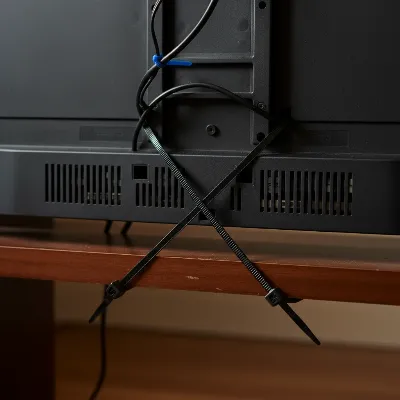 Close-up view of heavy-duty zip ties securing a TV to a wooden stand, demonstrating a DIY method
Enhancing Stand Stability with Added Weight
Beyond direct tethering, you can significantly improve the overall stability of your TV stand by strategically adding weight to its base. This simple trick increases the stand’s inertia, making it much harder to accidentally tip over. Place heavy items such as books, decorative stones, wrist weights, or even small bags of sand on the lowest shelves or inside compartments of the TV stand. A good rule of thumb is to add weight equivalent to approximately half the weight of your television. For example, if your TV weighs 40 pounds, adding about 20 pounds to the stand’s base can provide a noticeable improvement in stability, especially when combined with anti-tip straps or zip ties.
Advanced Security Measures
While securing the TV to its stand is a primary step, ensuring the entire unit is stable takes safety to the next level.
Anchoring the TV Stand to the Wall
To achieve the highest level of stability, especially with heavier televisions or in homes with active children, anchoring the TV stand itself to the wall is highly recommended. This prevents the entire piece of furniture, and consequently the TV, from tipping forward. Use heavy-duty furniture straps or steel cable anchors designed for this purpose. Just as with securing the TV, you’ll need a stud finder to locate the wall studs. Attach one end of the furniture strap to the top rear of your TV stand and the other end securely into a wall stud using appropriate screws. If a stud isn’t available exactly where you need it, use heavy-duty drywall anchors, though studs always offer superior strength. Regularly check these anchors and straps to ensure they remain tight and secure over time.
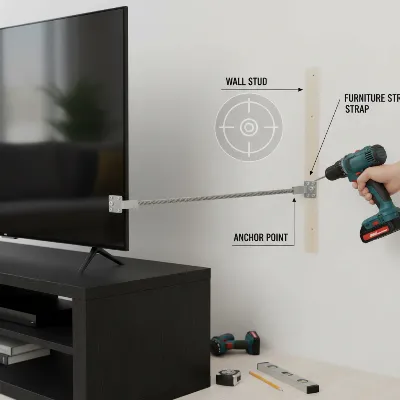 A TV stand being anchored to a wall with a metal furniture strap, highlighting the studs behind the wall
The Wall Mounting Alternative
While this article focuses on securing a TV to its stand, it’s worth noting that wall mounting remains the most secure method for TV placement. A properly installed wall mount completely removes the TV from any furniture surface, eliminating the risk of tip-overs from a stand. Wall mounting frees up floor space and places the TV out of reach of children and pets. However, it requires careful planning, the right bracket for your TV’s size and weight, and a solid understanding of how to find and drill into wall studs. If securing to a stand doesn’t offer the peace of mind you seek, or if you prefer a minimalist look, wall mounting is an excellent, albeit more involved, alternative.
Best Practices for TV Safety
Beyond the initial installation, maintaining a vigilant approach to TV safety is crucial for long-term protection.
- Regular Checks: Periodically inspect all straps, zip ties, and anchors to ensure they remain tight and have not loosened over time. Vibrations, temperature changes, and general wear can sometimes affect their integrity.
- Cable Management: Keep all TV cables and wires neatly organized and out of reach. Dangling cables can be a tempting pull-hazard for children and pets, potentially leading to a tip-over even with secure straps.
- Strategic Placement: Avoid placing appealing items such as toys, candy, or remote controls on the TV stand, especially near the front or edges. These items can entice children to reach, climb, or pull on the TV or stand.
- Educate Your Family: Teach children about the dangers of climbing on furniture or playing near the TV. Explaining the risks in an age-appropriate manner can be a powerful preventative measure.
- Choose the Right Stand: If you are purchasing a new TV stand, always select one that is wider than your TV and has a deep, stable base. Avoid using dressers or other furniture not specifically designed to support the weight and dimensions of a television.
By incorporating these best practices into your home safety routine, you create a comprehensive defense against potential TV tip-over accidents.
Conclusion
Securing your heavy TV to its stand is a proactive and essential step towards creating a safer home. Whether you opt for the robust support of anti-tip straps, the practical simplicity of heavy-duty zip ties, the added stability of weighted bases, or the comprehensive security of anchoring the stand to the wall, each method contributes significantly to preventing tip-over accidents. These DIY solutions are not only affordable but empower you to take direct control over your family’s safety and protect your valuable electronics. Prioritizing TV security offers invaluable peace of mind, allowing everyone to enjoy their living space without unnecessary risks. Don’t delay—take action today to safeguard your home. What steps will you take to safeguard your home against TV tip-overs?
Frequently Asked Questions
Can I use a dresser as a TV stand?
Using a dresser as a TV stand is generally not recommended unless it is explicitly designed for the purpose and is extremely sturdy, wider than the TV, and anchored to the wall. Dressers are often top-heavy and not built to withstand the specific forces that could cause a TV to tip.
How often should I check my TV’s security?
It is advisable to check your TV’s security straps, zip ties, and anchors periodically, such as every few months or after any significant household event like an earthquake or furniture rearrangement. This ensures all connections remain tight and effective.
What if my TV stand doesn’t have holes for straps?
If your TV stand lacks specific attachment points for anti-tip straps, you might need to drill pilot holes into a sturdy, non-aesthetic part of the stand. Alternatively, consider using heavy-duty zip ties around the stand’s structural elements, or focus on anchoring the entire stand to the wall.
What kind of screws should I use for wall anchoring?
When anchoring a TV stand to a wall, always use screws that are long enough to penetrate at least one inch into a wall stud for maximum stability. If a stud is not available, use heavy-duty toggle bolts or expanding anchors specifically designed for drywall, ensuring they can support significant weight.
Frequently Asked Questions
Can a dresser be safely used as a TV stand?
Using a dresser as a TV stand is generally not recommended unless it is specifically designed for that purpose, is wider than the TV, and is anchored to the wall. Dressers are often top-heavy and not built to withstand the specific forces that could cause a TV to tip over, posing a significant safety risk.
How frequently should I inspect my TV's security measures?
It is advisable to check your TV's security straps, zip ties, and anchors periodically, such as every few months or after any significant household event like an earthquake or furniture rearrangement. This ensures all connections remain tight and effective, maintaining optimal safety.
What options are available if my TV stand lacks holes for security straps?
If your TV stand lacks specific attachment points for anti-tip straps, you can drill pilot holes into a sturdy, non-aesthetic part of the stand. Alternatively, consider using heavy-duty zip ties around the stand's structural elements, or focus on anchoring the entire stand to the wall for enhanced stability.
What type of screws are best for anchoring a TV stand to a wall?
When anchoring a TV stand to a wall, always use screws that are long enough to penetrate at least one inch into a wall stud for maximum stability. If a stud is not available, use heavy-duty toggle bolts or expanding anchors specifically designed for drywall, ensuring they can support significant weight.
How much weight should I add to my TV stand for stability?
A good rule of thumb is to add weight equivalent to approximately half the weight of your television to the stand's base. For example, if your TV weighs 40 pounds, adding about 20 pounds to the stand's base can provide a noticeable improvement in stability, especially when combined with other security measures.
How to Secure Your TV to its Stand
Learn how to secure your television to its stand using various DIY methods to prevent tip-over accidents and ensure a safer home environment.
Locate the VESA mounting holes on the back of your TV. Ensure your TV stand is stable, level, and robust enough to support the television's weight and size. Position the TV as far back on the stand as possible to maximize balance.
Attach one end of the anti-tip strap to the VESA mounting holes on your TV. Secure the other end to the TV stand or directly to a wall stud behind the stand. Ensure all connections are tight and free of slack.
Thread heavy-duty zip ties through sturdy openings on the back of your TV and around strong, fixed parts of the TV stand. Use at least four zip ties in a cross-pattern if possible, pulling them tightly to secure the TV firmly to the stand.
Strategically place heavy items like books or sandbags on the lowest shelves or inside compartments of the TV stand. Aim to add weight equivalent to approximately half the weight of your television to increase inertia and prevent tipping.
For maximum stability, use heavy-duty furniture straps or steel cable anchors to secure the TV stand itself to a wall stud. Attach one end to the top rear of the stand and the other securely into a wall stud using appropriate screws. Regularly check these anchors for tightness.

I’m so glad I found these tips! We just got a new 75-inch TV and I was really worried about it tipping over with our two curious cats. The anti-tip straps were super easy to install and now I feel much more secure. It’s a small investment for such peace of mind, especially knowing the statistics about accidents.
The idea of anchoring the TV stand to the wall was a game-changer for me. I have a toddler who’s starting to pull himself up on everything, and our old stand felt a bit wobbly with our big screen. It took a little extra effort to get it done, but now the whole setup is rock solid. Definitely worth the extra step for safety.
This was exactly what I needed! My new gaming setup includes a massive monitor on a stand, and I was always nervous about it getting bumped. The advice on securing modern, slim TVs with smaller bases really hit home. I used a combination of straps and making sure the stand was flush against the wall, and it feels incredibly stable now.
I tried using the heavy-duty zip ties for my smaller TV, and while they did add some stability, I’m not sure they’d be enough for a really large, heavy set. It was a quick fix, but I think for bigger TVs, the straps or wall anchoring would be better. Still, it’s a good temporary solution if you’re in a pinch.