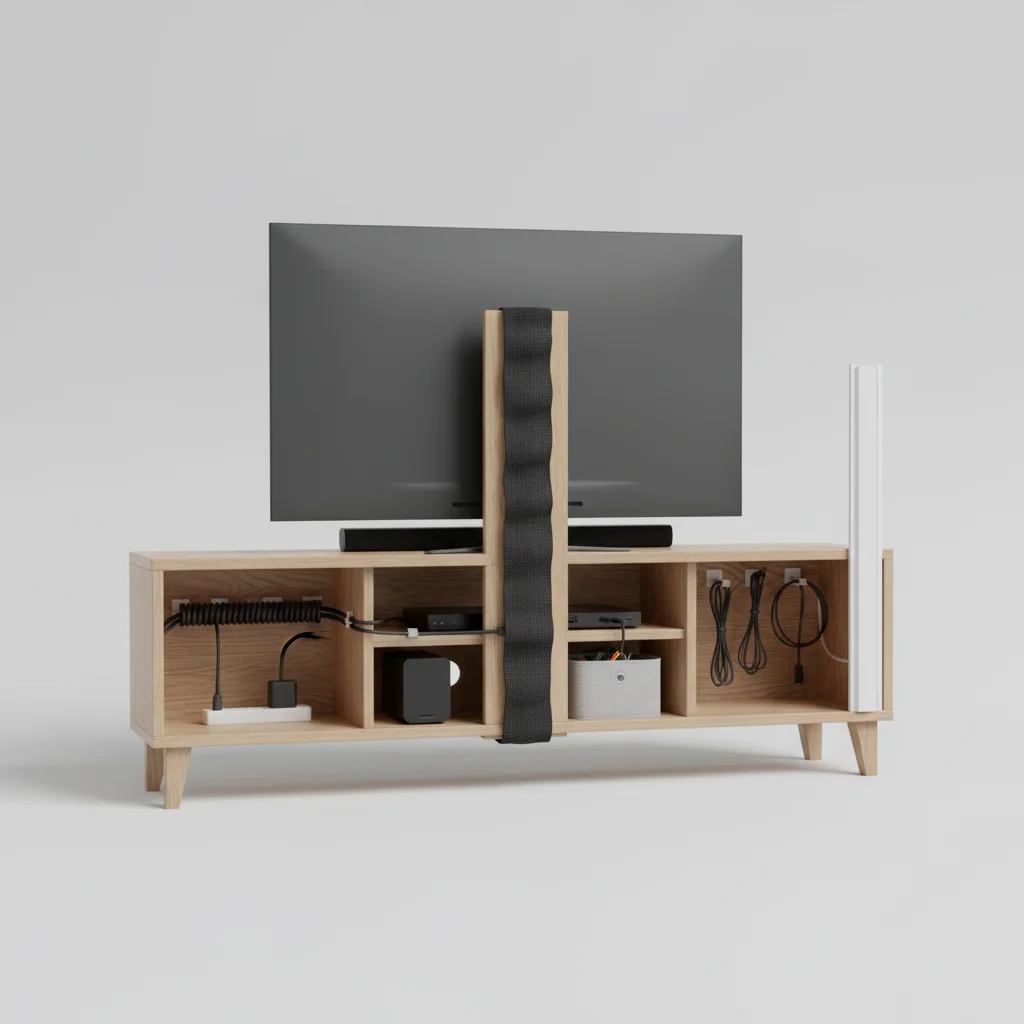
Effective TV stand cable management is crucial for a clean and organized entertainment area, and there are five primary methods to achieve this. From simple ties to integrated systems, managing the tangle of wires behind your television and media devices not only improves aesthetics but also prevents dust accumulation and potential tripping hazards. A well-managed setup enhances the overall look of your living space and makes troubleshooting much easier.
1. Utilize Cable Ties and Sleeves for Basic Organization
The most straightforward approach to TV stand cable management involves using cable ties and sleeves. Cable ties, available in reusable hook-and-loop or single-use plastic, bundle multiple wires together, preventing them from sprawling across the floor or behind the stand. Cable sleeves, often made from neoprene or braided fabric, encase several cables into a single, neat tube. This method is inexpensive and highly effective for immediate visual improvement, especially for cables that run vertically or horizontally in a straight line. Ensure you leave enough slack in the cables to avoid strain on the ports.
2. Invest in a Dedicated Cable Management Box
For a more comprehensive solution, a cable management box can hide power strips, excess cable length, and even small adapters. These boxes typically feature openings on the sides for cables to enter and exit, keeping the bulk of the wires out of sight. They are particularly useful for areas where multiple devices converge, such as near a power outlet. Look for boxes with ventilation to prevent overheating of power bricks and chargers.
3. Integrate Cable Channels and Raceways
|
Our Picks for the Best TV Stand in 2026
As an Amazon Associate I earn from qualifying purchases.
|
||
| Num | Product | Action |
|---|---|---|
| 1 | TV Stand for TVs up to 55", Entertainment Center with 2 Fabric Drawer, Media Console with Shelves, Television Stands for Living Room, Bedroom, Black DS02BB |

|
| 2 | HOOBRO LED TV Stand with Power Outlets to 65 inch TV, Gaming Entertainment Center with Glass Shelves and Large Drawer, Modern Media TV Console Table for Living Room Bedroom, White WT14UDDS01 |
|
| 3 | 23 Inch to 50 Inch Floor Small Corner TV Stand with Storage Shelves for Living Room Bedroom, Universal Floor Television Stands with Mount, Rustic Brown Corner TV Table Desk Shelf for Small Space |
|
| 4 | Furinno Sully 3-Tier Stand for TV up to 40, Espresso/Black |
|
| 5 | PERLESMITH Universal Swivel TV Stand for 24-60 inch TVs up to 99 lbs, 12 Height Adjustable Table Top TV Stand, TV Base Stand with Tempered Glass Base, Max VESA 400x400mm, PSTVS33 |
|
| 6 | WALI Floor TV Stand with Power Outlet, Tall TV Stand Mount for 32-75 inch TV up to 110 lbs, Swivel and Height Adjustable TV Stands with Wood Base for Bedroom, Office(TVDVD-7P), Black |
|
| 7 | HOOBRO TV Stand with Power Outlets to 65 Inches, TV Console Table with Open Storage Shelves, Industrial Media Entertainment Center for Living Room Bedroom, Rustic Brown and Black BF40DS01 |
|
| 8 | YGEOMER Entertainment Center for Up to 55 Inch TVs, TV Stand with Power Outlet and Open Storage Shelves, TV Media Console Table for Living Room and Bedroom, Black |
|
| 9 | HOOBRO TV Stand with Charging Station to 55 Inches, LED Entertainment Center, Media TV Console Table with Open Storage Shelving for Living Room, Bedroom, Black BB122UDDS01 |
|
| 10 | Furologee TV Stand for TVs up to 55 Inch, Entertainment Center with Open Storage Shelves, Media Console Table with Soundbar Shelf for Living Room, Bedroom, Rustic Brown |
|
When you need to route cables along walls or the back of your TV stand, cable channels and raceways offer a clean, semi-permanent solution. These adhesive or screw-mounted tracks conceal cables entirely, blending them into the surrounding decor. They are ideal for hiding power cords and HDMI cables that need to travel a certain distance without being seen. Many raceways are paintable, allowing them to match your wall color for an almost invisible finish. Measure the length of your cable runs carefully before purchasing to ensure adequate coverage.
4. Leverage Built-in Features of Modern TV Stands
Many contemporary TV stands are designed with integrated cable management features. These can include pre-drilled holes in shelves, cutouts in the back panel, and even dedicated channels within the stand’s structure. When purchasing a new TV stand, look for these thoughtful additions as they significantly simplify the organization process. These features often allow cables to pass through discreetly, keeping them hidden from view while maintaining easy access for connections. Always check the product specifications for details on integrated cable management options.
5. Employ Adhesive Clips and Mounts for Strategic Routing
For individual cables or specific routing needs, adhesive clips and mounts are invaluable. These small, self-adhesive devices can be attached to the back of your TV stand or along the underside of shelves to guide cables precisely where they need to go. They prevent cables from dangling or becoming entangled, offering a custom solution for each wire. They are particularly useful for managing power cords, speaker wires, and network cables that might need to follow a specific path. Ensure the surface is clean and dry before applying for maximum adhesion.
- Use reusable hook-and-loop ties for flexibility.
- Select cable sleeves that match your decor.
- Choose a cable management box with adequate ventilation.
- Opt for paintable raceways for seamless integration.
- Apply adhesive clips to clean, dry surfaces for best results.
By implementing these five methods, you can effectively tame the cable tangle behind your TV stand, creating a more organized, safer, and aesthetically pleasing entertainment setup. A little effort in cable management goes a long way in enhancing your home’s overall tidiness and functionality.

I was so tired of the spaghetti monster behind my TV stand! This guide on cable ties and sleeves was a lifesaver. I picked up some reusable hook-and-loop ties and a fabric sleeve, and now everything looks so much cleaner. It really does make a huge difference in the overall look of my living room. Highly recommend trying this if your entertainment area is a mess.
Finally tackled the mess behind my entertainment center thanks to these ideas! The mention of preventing tripping hazards really hit home, especially with kids and pets around. I used a combination of ties and some adhesive clips to secure everything to the back of the stand. It looks fantastic and feels so much safer now. Wish I’d done this sooner!
I tried the cable ties and sleeves, and while they helped a bit, I still feel like my setup isn’t as clean as I’d like. I have a lot of devices, and even with bundling, it still looks a little cluttered. I was hoping for something that would completely hide everything. It’s better than before, but I might need to look into more integrated systems for my specific needs.
I’ve been struggling with dust accumulation behind my TV for ages, and I never connected it to the tangled cables. The tip about how better cable management prevents dust was a real eye-opener. I’ve started using a few of the methods mentioned, and while it’s not perfect yet, it’s definitely an improvement. My only minor complaint is that some of the thicker cables were a bit hard to get into the sleeves.